Steps to Complete Before 12/31/25
Step 1
To become familiar with this year's requirements, stipulated by the Internal Revenue Service (IRS®), review the following IRS publications:
IRS Publication 1179
IRS Publication 1220
Step 2
Ensure that the appropriate access has been granted for users working with the Tax Information Module.
For a complete list of tax reporting steps, reference the Compass XD - Tax Reporting section.
Step 3
Update A Record Information
Select Parameter Maintenance
Module Name: TAX_INFORMATION
Parameter File: TXAREC (Update 'A' Record)
Select Submit
Verify that all information in Update A Record is accurate
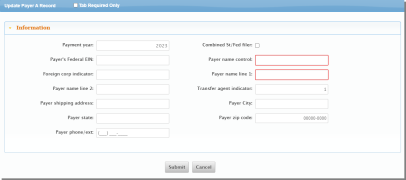
Select Submit
Payment year should reflect the tax year that is being reported to the IRS.
All "A" record information is that of the bank.
Step 4
If reporting by branch,
Select Parameters Maintenance.
Module Name: TAX_INFORMATION.
Parameter File: TXARECBR (Payer 'A' Record Branch Information).
Select Submit.
Select the Edit icon beside each branch.
Change the Payment Year to 2025 in the A record for the branch and verify the information in the other fields are correct.
Select Submit.
Step 5
Select Parameter Maintenance.
Module Name: TAX_INFORMATION.
Parameter File: TXTREC (Transmitter 'T' Record).
Select Submit.
All 'T' Record information is that of the Transmitter of the tax file to the IRS.
Verify that the Transmitter T record is set up, including that the Payment Year is set to 2025.
NOTE: For data center customers, all transmitter information will be completed/verified by the data center.
Select Submit.
Step 6
If reporting by branch, select Parameter Maintenance.
Module Name: TAX_INFORMATION.
Parameter File: TXTRECBR (Transmitter 'T' Branch Information).
Select Submit.
Select the Edit icon beside each branch.
Verify that the transmitter T record is setup, including that the Payment Year is set to 2025.
All 'T' Record information is that of the Transmitter of the tax file to the IRS.
NOTE: For data center customers, all transmitter information will be completed/verified by the data center.
Select Submit.
Step 7
Verify that the bank-processing calendar has some days defined in January 2026 so that processing through the year-end occurs the same as any other day that includes a holiday in the calendar file.
NOTE: Complete this step in any other SHAZAM database on the system, such as Shareholders.
NOTE: For data center customers, calendars are sent out quarterly for review and approval. Please review the calendars sent to the data center to ensure January dates have been approved.
Step 8
Update/Review Bank Tax Parameters.
Select Parameter Maintenance.
Module Name: TAX_INFORMATION.
Parameter File: TXPAR1 (Bank Level Tax Reporting Parm File).
Select Submit.
Update the thresholds needed and review all fields reflected for any additional changes.
Select Submit.
Step 9
Review IRA Statement Definitions.
Select Parameter Maintenance.
Module Name: DEPOSITS.
Parameter File: DDISTM (IRA Statement Definition Lines).
Select Submit.
Verify there is an IRA statement definition set up for each type of IRA. If the description of an amount (AMT) code refers to a specific year, update it for the appropriate tax processing year.
Statement definitions may need to be updated with any new codes defined by the IRS.

Step 10
Review IRA Transaction Codes.
Select Parameter Maintenance.
Module Name: DEPOSITS.
Parameter File: DDITC2 (IRA Transactions Codes).
Select Submit.
Select Deposit Parameters.
Select IRA Tran Codes.
Verify that IRA transaction codes are defined for each statement definition.

Step 11
This step is optional.
NOTE: This report includes all bank customers and will be lengthy.
Review the legal names and name controls of customers prior to year-end.
This can be done through a query report.
Step 12
This step is optional, although recommended.
At the account level, review the Send 1099, Send 1098, Send 1099-MISC or Suppress 1099-INT fields to ensure that the proper accounts are reporting to the IRS. This can be done through a query or Insight report.
This field is located at the Account Level.
Select Additional
Select the Edit icon
The General tab will be displayed
Select Print tab
Suppress 1099-INT form (The account specific form will be reflected).
Step 13
Balancing IRA accounts must be completed prior to year-end processing.
Reference End of Year Balancing documentation for steps on balancing IRA accounts and creating the IRA statement file.